We’ve Expanded AI Support!
We’ve broadened AI assistance across additional PowerSchool solutions, making it easier to get guidance when you need it. Learn More
How A Explorer/Student Can Connect With A Navigator
Summary
This article explains the process of how an explorer/student can connect with a navigator.
Process
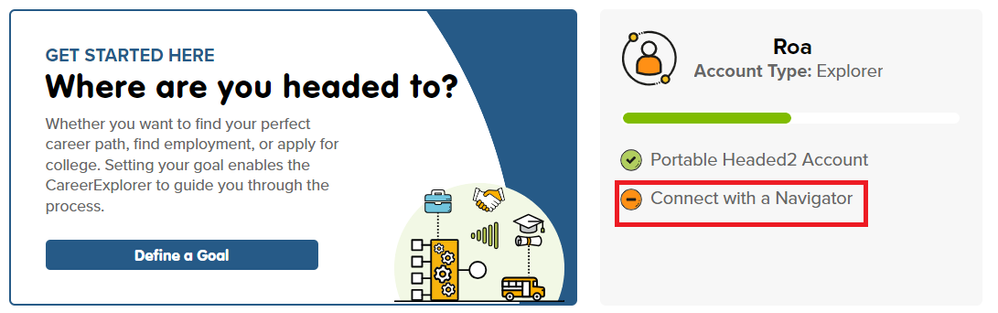
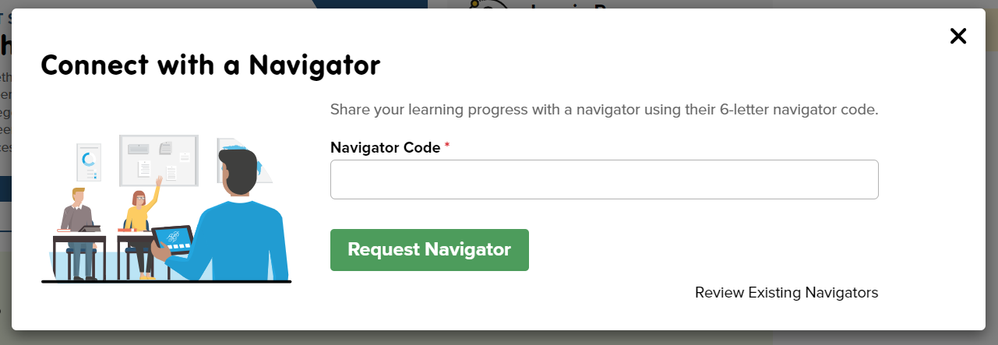
Students can use a 6-digit Navigator code. They will enter it by selecting "Connect with a Navigator" from the grey box on the homepage after they have logged in.
Summary
This article explains the process of how an explorer/student can connect with a navigator.
Process
Students can use a 6-digit Navigator code. They will enter it by selecting "Connect with a Navigator" from the grey box on the homepage after they have logged in.
Summary
This article explains the process of how an explorer/student can connect with a navigator.
Process
Students can use a 6-digit Navigator code. They will enter it by selecting "Connect with a Navigator" from the grey box on the homepage after they have logged in.