
We’ve Expanded AI Support! We’ve broadened AI assistance across additional PowerSchool solutions, making it easier to get guidance when you need it. Learn More
- PowerSchool Community
- :
- Our Community
- :
- Community Forum
- :
- Calculating an assignment to equal 5% of a Semester Grade
- Subscribe to RSS Feed
- Mark Topic as New
- Mark Topic as Read
- Float this Topic for Current User
- Bookmark
- Subscribe
- Mute
- Printer Friendly Page

Calculating an assignment to equal 5% of a Semester Grade

- Mark as New
- Bookmark
- Subscribe
- Mute
- Subscribe to RSS Feed
- Permalink
- Report Inappropriate Content
Calculating an assignment to equal 5% of a Semester Grade
We have tried using Mixed Weighting on the S1 grade setup however the issue is within Q2. Logistically, we cannot figure out how to properly add this to a Q2 grade where it will calculate as 5% of the student semester grade without drastically dropping the Q2 grade.


- Mark as New
- Bookmark
- Subscribe
- Mute
- Subscribe to RSS Feed
- Permalink
- Report Inappropriate Content
Can you create a separate reporting term? For instance, if Semester 1 runs 7-1-2025 - 1-25-2026, could you have Reporting Terms such as:
S1: 7/1 - 1/25/2026
Q1: 7/1 - 11/9
Q2: 11/10 - 1/22/2026
H1: 1/23/2026 - 1/24/2026
(H is for Hours)
You can then set up Term Weighting for the S1 as you see fit, and also have the Service Hours as their own assignment in one of the quarters.
Full Disclosure: I do not work for PowerSchool

- Mark as New
- Bookmark
- Subscribe
- Mute
- Subscribe to RSS Feed
- Permalink
- Report Inappropriate Content
Thank you for the reply! We thought about that but it would then affect all teacher grade books. This only affects our Theology department so I think (If I'm correct in saying), that if we create a term, it would be universal for the school.
- Mark as New
- Bookmark
- Subscribe
- Mute
- Subscribe to RSS Feed
- Permalink
- Report Inappropriate Content
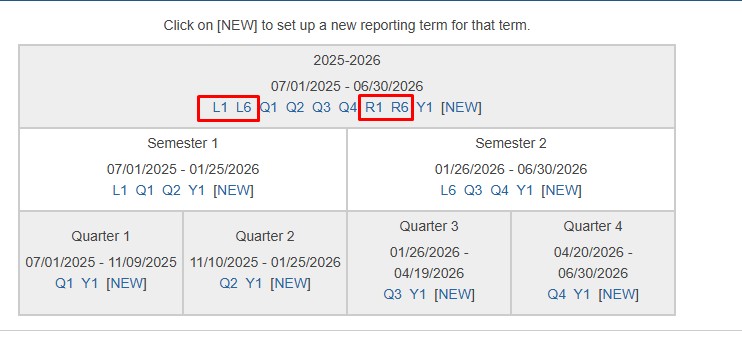
Yes, that is true, but it is very, very (very) common in the districts I work with. Teachers of classes that do not have to use the H1 reporting term can simply ignore it. I am in New York State. There are Local Final Exam and Regents (State) Exams. For full-year HS courses in NY, the reporting terms commonly look like the attached screenshot. Teachers who don't give a Regents exam ignore the "R-codes" and teachers who don't give a Local exam ignore the "L-codes." You can even still push out calculations from the Admin side while using multiple store codes. See screenshot 2. If you have questions feel free to ask.
Full Disclosure: I do not work for PowerSchool

- Mark as New
- Bookmark
- Subscribe
- Mute
- Subscribe to RSS Feed
- Permalink
- Report Inappropriate Content
Ah ok, one question though - since it's date based, if I create this H term for 12/15/2025 for example, if another teacher adds an assignment on that date, does it affect their Q1 or S1 weighting? Would they then have to weight their S1 as a term weighting (if they currently do term weighting and not total points) and add Q1, Q2, H1 (new category) and E1 (our final exam dates)?
- Mark as New
- Bookmark
- Subscribe
- Mute
- Subscribe to RSS Feed
- Permalink
- Report Inappropriate Content
The due date of an assignment dictates the reporting term it falls into. Reporting Terms need to be a minimum of two days in PS. Teachers can see the date range of the reporting terms in PT Pro. Yes, teachers of Theology would need to set the S1 as term weighing using Q1, Q2, H1 and E1. I don't know the specifics of how you grade but Theology teachers could do something like this for the S1:
Q1: 40%
Q2: 40%
H1: 5%
E1: 15%
Full Disclosure: I do not work for PowerSchool

-
Calculating an assignment to equal 5% of a Semester Grade in Community Forum on 12-10-2025
